Skip to content

Technical

Curing “Data Hugging Disorder”

Last Friday, the 1%Club held their (first, probably not last) 1%EVENT, about “international development cooperation 2.0”. I facilitated a session on “connecting the platforms”, to pave the (technical) way towards a cure for what Ushahidi’s Juliana Rotich aptly referred to as “ Data Hugging Disorder “. It resulted in a positive discussion with several people of organisations that build or host online platforms. Coming Monday, I hope the discussion continues at a meeting in The Hague about a possible Dutch IS-Hub.

Tools, platforms, exchange, goals
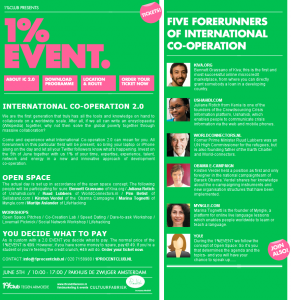
1pevent.png

The evolution of international development cooperation in a nutshell:

  1. first we tried to build the best water pump
  2. we realised we need to build the right water pump
  3. then we started to exchange lessons learned about building water pumps
  4. and now we have the Millennium Development Goals to let all water pump work contribute to a common goal (in this case: “ Target 7.C: Halve, by 2015, the proportion of people without sustainable access to safe drinking water and basic sanitation “)

“International Development Cooperation 2.0” heavily depends on using ICTs as tools for collaboration. In essence, my feeling is we’re repeating the process in building online platforms: some people still want to build the best platform, most are busy building the right platform for the situation, and (as the session proved) are getting ready to exchange the lessons we learn, and for standards to work towards common goals.

Open standards as a way forward

With several people in the room with (information-)technical affinity, the discussion quickly moved to open standards to choose or to develop. Although there are many concerns about privacy, identity, and security, an important breakthrough was that most of those concerns are not at all specific to the field of international development cooperation. We should make sure our concerns are documented, but more likely than not, those concerns will be addressed in some form by the big platforms. For the exchange of “actionable opportunities”, the Open Actions format is just emerging. The uncharted territory seems to be information around projects in international development.

Probably no coincidence: some of my current consultancy work is on project administration and project management solutions in such a context. Logframes are popular vehicles for project goals information, but so far I haven’t found clear patterns in how organisations deal with their projects and programmes from a management process point of view. Maybe this is the area where the conversation still needs to develop before standards can emerge.

A Dutch IS-Hub?

The time is apparently right to get to standardisation: indepently, Cordaid and their platform development company have initiated a discussion on Monday about how to deal with the technical, organisational and legal aspects of sharing information and reducing redundancy for people in building up expert profiles and making them available on various platforms.

Again, this is not an area specific to international development cooperation, so hopefully a chance to benefit from the work in many other places. Not so long ago, Aldo de Moor and I visited D-CIS at Delft University, where they try to solve similar problems in a different domain: how do you create “actor-agent systems”, where software helps a crisis manager to quickly get to the right expert in the case of a disaster. How to harvest expert profiles across many fields of expertise and organisations, and also take into account that an expert is not an expert anymore after 48 hours without sleep…

Making “data portability” the next “accessibility”

As the Dutch Ministry of International Cooperation is shaking up the NGO world here in The Netherlands. “Collaboration” and “Partnerships” are the new buzz words, and since “2.0” is part of the official policy, many organisations are slightly panicing about how to move forward, and how to quickly embrace some of that “2.0”. A great time to leapfrog for the Dutch international development cooperation world.

Over the years, “accessibility” has become a standard requirement for web sites. It’s easy for a client organisation to demand compliance to a certain level of accessibility as specified in open standards. It would be great if we now can move to a similar model with levels of “data portability”, to get NGOs to add those to the requirements of their next platform.

Hopefully, Monday’s discussion is a next step towards such a standard requirement, and also offers a common road map for the platform builders. That would also open up the opportunities for BarCamps and such to join forces on implementation.

A quick guide to standards

Here’s a dump of the standards mentioned at Friday’s meeting (not linked yet, but maybe one day):

  • News, updates: RSS, well-accepted by now
  • Identity and authentication: OpenID, OAuth
  • “Social actions”: Open Actions
  • Projects: Open Archive Initiative as meta-level, Dublin Core, DIDL, OpenPro
  • Constituency, membership:?
  • Social networks: FOAF, XFN
  • Applications: Open Social, Facebook Connect?
  • Payments: mobile banking? how to do payments?
  • Market places:?

Raw notes of the session

After an intro by Niels about the importance of open source and free software as a basis, and my intro about Social Actions, the Change The Web contest, and the emerging Open Actions format, almost all of the 25 or so attendees (note to self: build a list of participants again next time!) shared their concerns and aspirations. I have tried to write down key elements I heard, here’s the raw dump of the flip chart notes:

  • How to work together? Technical standards seem feasible, pride and identity seem to get in the way.
  • What are the standards we should focus on?
  • Is there any form of collaboration already?
  • What open standards for exchanging projects are there? Is it about project information, how to deal with quality, what about the social networking around it?
  • How to get away from having profiles on many different sites?
  • How to enable collaboration on many different platforms?
  • How to make the collaboration itself central: from social network to collaboration network?
  • For example: how to get Kiva into your project environment, rather than your project into Kiva?
  • Concerns about identity, safety, privacy, security. How to keep control over where your information and identity is going?
  • What formal ways are there to capture documentation?
  • How to activate people who normally wouldn’t be active or interested in this context?
  • Can we enable knowledge sharing through micro-blogging?
  • How to guide the choice of a platform?
  • How would we even define “platform”, are we all talking about the same thing when we use that word?
  • Lets create best practices, compatibility, and meta standards. But: we can’t do that, “Google should do it” and “Facebook wins”.
  • Types of information we could share, standards in that area we could use (see earlier in this post).
  • Which platform gets what part? For instance: the business model of one platform is based on taking a percentage of the funds raised – how to deal with that when adding the fund raising feature to another platform?

Thanks 1%Club

For the 1%EVENT, Bart and Anna walked the talk, listened to all the suggestions made to them over time, and had two great Open Space facilitators to set up the day’s agenda. Maybe not every attendee and “poster pioneer” felt comfortable with it at once, but the co-created, slightly chaotic and creative sequence of events was precisely the kind of event I missed in The Netherlands so far!
Plumbing on the web

Social Media Plumbing:

plumbing.png

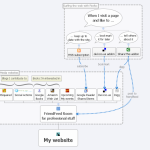
A post by Robert Scoble made me have another look at rooms in FriendFeed. I set things up over the weekend, and decided to document it, to maybe succeed in explaining what this is all about. Here’s my situation:

  • I post content on various social media sites through various tools
  • I want some of that content to appear on my own website
  • I switch platforms quite often, or start using them in a different way, so keeping it up to date should be easy

So I decided to start a FriendFeed room with content that I want to appear on my site 1, and use their feed widget to then display it on my home page. It still took some effort (to get the styling how I wanted it), but it’s done, and here’s how.

Connecting the pipes

The schematic picture 2 shows how things connect:

I surf the web and come across pages or sites that interest me.

I collect all the stuff in a FriendFeed room from various sources:

My next steps will be to set up similar aggregators other collections of life streams, to feed into other places. And to draw some more pretty pictures on how it is all connected 🙂

1 My website runs on Drupal, which could aggregate things directly, but Drupal still rarely delivers the “should be easy” part, and I wanted to move forward with content, not code or config.

2 I’ve made this scheme in Xmind, a mind-mapping tool that recently went (partly) open source. I’ll post the source file soon.

Update: the source for the image is now attached.

Moving to Ubuntu

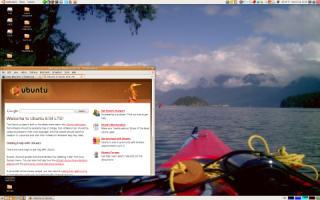
I’ve finally made to switch: my desktop now is open source! I’ve pushed back for quite some time, had too many programs that still required Windows, and generally just wasn’t ready. But now I did it. My laptop needed a fresh install, and I tried out the latest Ubuntu (going under names like 8.04 and Hardy and Hardy Heron). And decided to stay with it, after trying out things for several weeks. Why?

moving-ubuntu.png

My Ubuntu desktop

  • Windows XP was running smoothly, but I found myself duplicating efforts on figuring out how to do things on Windows, when I just did them on a Linux server, to have a good local development environment. And I had already switched to mostly open source software for my day-to-day work.
  • Linux is catching up with the usability thing. The latest Ubuntu managed to present a desktop that didn’t feel like falling back into the last century, and it recognised most hardware. Particularly, I now could get my wireless working without a lot of effort, something I didn’t manage 2 years ago.
  • I’ve been able to find reasonable alternatives for almost all software I used. Sometimes it is a bit half-baked, but then again, it covers the 80% of the cases I use it for, and at least I can do my work the way I did, most of the time. Installation and removal of “supported packages” definitely is easier. And a lot of software is more “hackable” (example in a next post).
  • VirtualBox is like the VMware I had (but now it’s free), and it allows me to run a Windows XP virtual PC inside my Ubuntu desktop. Sadly, though, it fails on the only thing I really need: reporting my invoices and expense declarations…

There’s still stuff to be desired, too:

  • Most of the special features of my laptop seem to be unavailable, even though it’s not really the latest model. It is a Sony, with several Intel components, where Intel is supposed to be reasonably open source friendly. But the LED light for the wireless doesn’t work, and I can’t do dual screen (on the other hand, I can do 1920×1200 resolution on my external screen, which wasn’t possible under Windows)
  • I easily find myself searching the interwebs for solutions, with information from 2006 or even 2007 that seems to be completely irrelevant to my version, and lots of software that is hardly documented at all. A lot would be more or less “impossible” without knowing quite a bit of the technology under the hood, and ample time to research and hack away.

First look at Tasktop

Today I took a first look at Tasktop (claiming it "takes the effort out of being organized"). It didn’t quite take the effort out of being installed, but I’ve kind of grown used to that with Eclipse, and it is still in beta. Tasktop is taking Mylyn, the "task-focused interface" to a whole new level. First geeky impressions from an Eclipse user.

Mylyn starts…

  • Creating and scheduling tasks: define the things to do, and schedule them for a particular day. Then work through the list.
  • Provide "context": activate a task, and Mylyn keeps track of which files you open and edit. You can then "focus" the interface, showing only those files, and store the context with the task. Next time you activate the task, it will only show those files. (I still have to get the hang of it, though)
  • Integrate with several issue trackers (Bugzilla, Trac, and also Mantis). So I have the issues in our tracker that are assigned to me available as tasks in Mylyn.

Tasktop continues…

The thing I like the most so far is the integration with Google Calendar, since I already use that to share information with my colleague.

  • See items from selected Google calendars in a week overview, and post the tasks I schedule to a calendar of choice. Makes it easy to share more detailed workplans, and to reschedule from either Google Calendar or Eclipse with Mylyn and Tasktop.
  • Have a week overview with all the tasks from various calendars.
  • Easily navigate to either a browser window for a calendar appointment, or the issue ticket in a tracker. Tasktop nicely stores a link to the issue tracker in the Google Calendar appointment.

Tasktop also can link to your Outlook tasks and emails. I can only hope someone will make that work for my Palm desktop too… I’m still not ready to start using Outlook.
Ever since I read the first bits about Mylyn (called Mylar in the old days) I have been eager to see each next step. Eclipse makes it easy to connect to different version control repositories, work in different languages, and on different servers. Mylyn makes it easy to connect with various issue trackers to work as task repositories, and now Tasktop starts adding more scheduling options too. Having a single, uniform, and consistent interface to work on a variety of projects and backbones is getting closer.

Browser compatibility testing

While trying to find good resources for browser compatibility, I came across some interesting services to check the output of a web page on different platforms and browsers.

  • Browser Photo delivers pictures of a page in different screen sizes on WebTV, iMac, and PC (Windows 2000), for IE and NS mainly (no Mozilla…). $150 for a year unlimited checking.
  • ScreenShotService offers a very similar service, and includes Linux and Mozilla, but only IE from version 5 on. €480 euro for a year. It’s in German.
  • BrowserCam is more sophisticated, and also offers VNC to check mouse-overs, forms, and so on, with more browsers, different Windows versions, Linux, etc. $480 for a year unlimited checking.
  • ieCapture is an attempt to create snapshots of a site in several iMac browsers. It’s very alpha still, and not always available.

Related resources:

  • AnyBrowser offers a SiteViewer for browser compatibility testing. They created an HTML specification that represents the lowest common denominator across browsers, so the idea is that if it shows up ok in the SiteViewer, it shows up ok in any browser. They also promise to have a desktop version available again.
  • Download older versions of browsers from the browser archive. And find out how many browsers there are 🙂 Another site offers stand-alone versions of IE to be able to have more IE versions on one machine. And at Deja Vu you can read more about browser history.